
Project report software for bank loans
Project Report Software for Bank Loans (DPR)
A project report is the document a bank reads before it sanctions a loan, and project report software is what keeps every figure in that document consistent. Finxora builds the project cost, the means of finance, the projected statements, the EMI repayment schedule, DSCR and break-even from one set of inputs, so the numbers agree from the summary through to the schedules at the back.
- PDF, Word and Excel export
- DSCR and break-even included
- Free sample download
What's covered
Everything this page explains, at a glance.
What is a project report (DPR)?
A project report — the detailed project report or DPR — is the appraisal document a bank studies before it sanctions credit. It introduces the promoter and the business, costs the project, shows how that cost will be funded, and projects how the unit will sell, earn and repay over the years the loan runs.
Read moreWhen banks ask for a project report
The request normally arrives with the loan application itself. These are the situations in which a bank or financial institution will ask for a project report rather than only historical accounts:
Read moreWhat the project report contains
Finxora's downloadable project report is built from the statements below. You choose which of them to include at export time; these are the sections the generator produces:
Read moreFinancial projections and ratios (DSCR etc.)
Everything in the report is projected — operating statement, balance sheet, cash flow, depreciation and debt service for each report year, up to the twenty-five years the project master allows. The calculation engine derives them from your inputs rather than asking you to type each statement, so the balance sheet tallies and the ratios follow from the figures shown.
Read moreHow to make a project report in Finxora
Create the project master: Enter the firm and promoter profile — constitution, activity, location and starting year — choose the report years to project, and tag the loan type as Mudra, PMEGP, Normal MSME or another scheme.
Read moreSample project report format
See a finished document before building one: the samples page carries a full project report in the order a bank expects to read it — profile, project cost, means of finance, statements, ratios and schedules — a checklist for your own report. The features page lists the same capabilities in more detail.
Read moreOverview
This page covers what a project report (also called a detailed project report, or DPR) contains, when banks ask for one, the sections Finxora generates, the projections and ratios it calculates, and the steps to build one.
What is a project report (DPR)?
A project report — the detailed project report or DPR — is the appraisal document a bank studies before it sanctions credit. It introduces the promoter and the business, costs the project, shows how that cost will be funded, and projects how the unit will sell, earn and repay over the years the loan runs.
Banks read it as one story told in numbers. Every rupee of project cost must appear in the means of finance; every year's profit must flow into the projected balance sheet, the cash flow and the repayment capacity. A DPR for a bank loan therefore follows the standard appraisal format used by Indian banks: profile, cost and funding, statements, then the debt service and ratio working behind the sanction.
When banks ask for a project report
The request normally arrives with the loan application itself. These are the situations in which a bank or financial institution will ask for a project report rather than only historical accounts:
- New unit — a first-time borrower setting up a manufacturing, service or trading venture, where projections are the only forecast of repayment ability.
- Term loan — sanction of a loan for plant and machinery, a building, or equipment, where the bank wants the cost of the project and its funding pattern in one place.
- Expansion or modernisation — an existing unit adding capacity, so the report sits alongside the history of the current business.
- Working capital enhancement — when limits are raised and the bank wants forward-looking statements rather than only historical accounts.
- Scheme loans — the project master tags the application as Mudra, PMEGP, Normal MSME or a custom scheme type, so the same report structure serves a scheme application or a plain term-loan proposal.
What the project report contains
Finxora's downloadable project report is built from the statements below. You choose which of them to include at export time; these are the sections the generator produces:
| Section | What it contains |
|---|---|
| Company Profile | Constitution, activity, location, PAN, GST and Udyam details, plus promoter and partner particulars. |
| Project Narrative | The written introduction and project story; Finxora's AI drafts it from your profile and it stays editable before export. |
| Project Cost Breakdown | Land, building, plant and machinery, miscellaneous fixed assets and other cost lines, item by item with yearly totals. |
| Means of Finance | Own contribution, term loan or several term loans, working capital loan and subsidy — every source, adding back to the project cost. |
| Revenue & Expenses | Selling price, capacity and utilisation, purchases and direct and indirect expenses for each year — month-wise, including seasonal rows limited to their active months. |
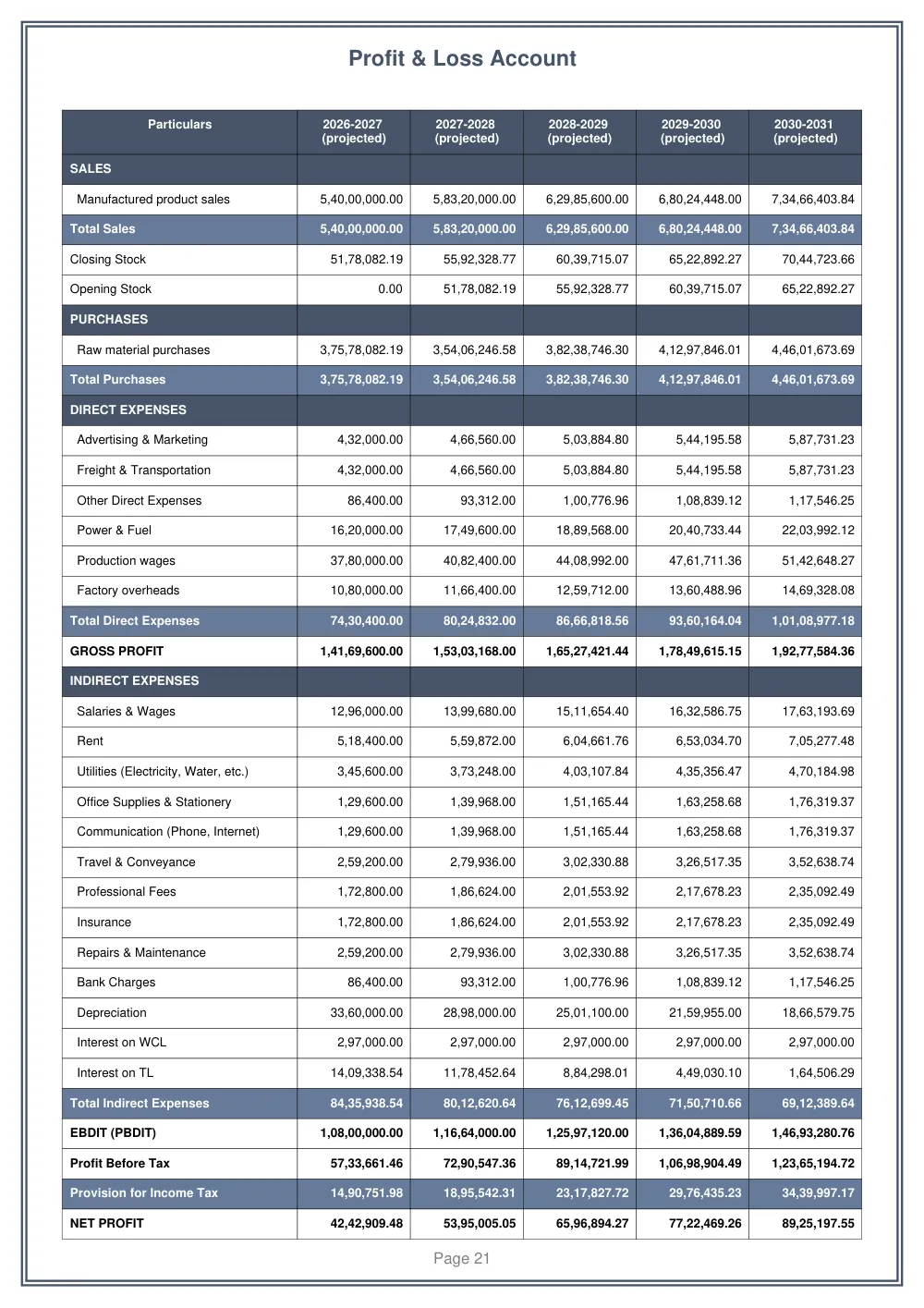
| Profit & Loss Account | Sales through gross profit, EBDIT, interest, depreciation, tax provision and net profit for every year. |
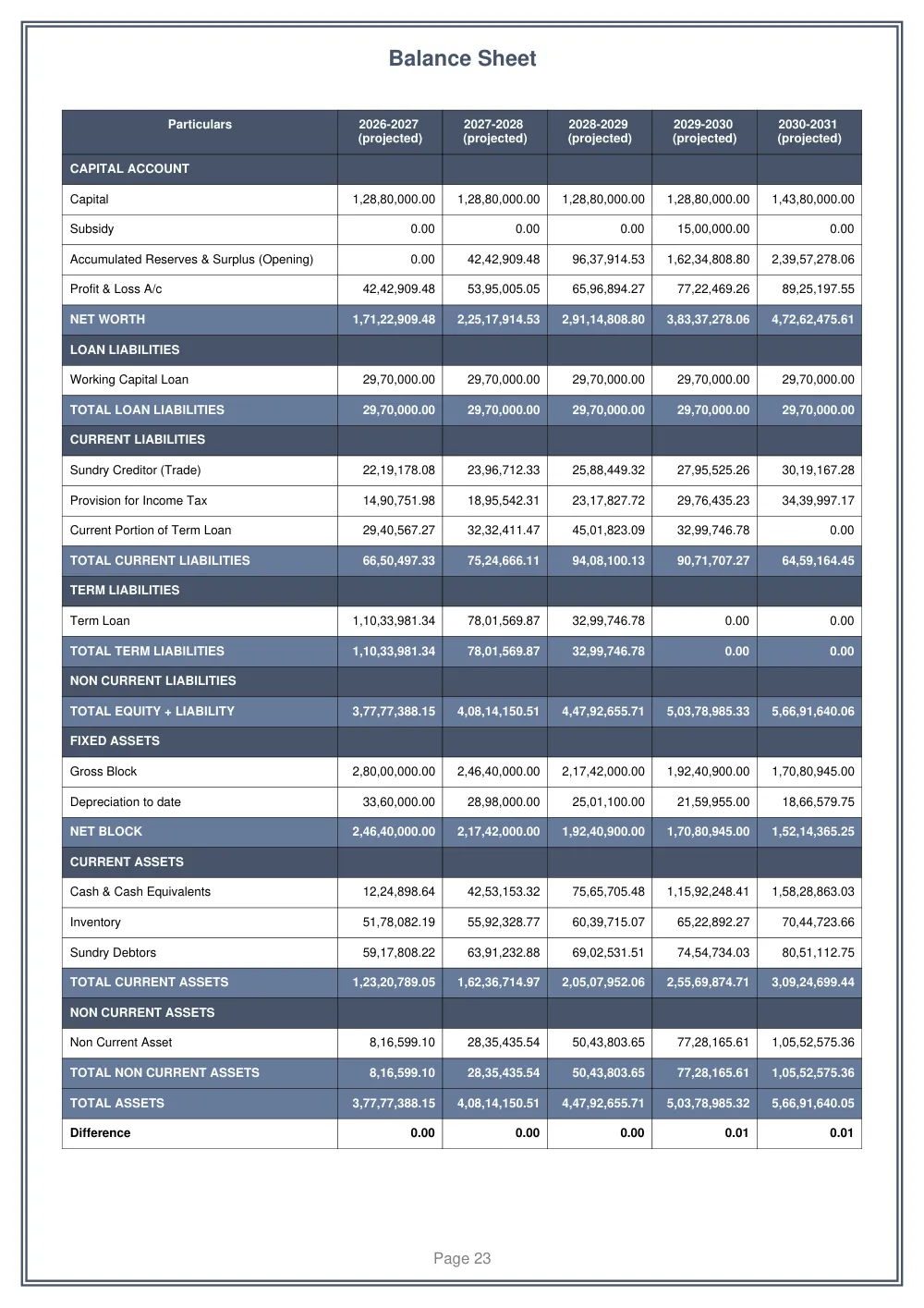
| Projected Balance Sheet | Assets, liabilities and net worth, with closing balances carried forward year to year. |
| Cash Flow | Inflows from capital, subsidy and borrowings against outflows for assets, interest, principal and drawings. |
| Depreciation | The asset-wise depreciation chart under the configured method, written into the operating statement and balance sheet. |
| EMI Repayment Schedule | Month-wise opening balance, EMI, principal, interest and closing balance — one schedule per loan. |
| DSCR | Receipts against repayments for each year, the DSCR itself, and the average DSCR row banks look at during appraisal. |
| Ratio Analysis | Liquidity, profitability, leverage and solvency ratios, each with its formula. |
| Breakeven Point | Break-even sales value, the break-even point as a share of sales, and margin of safety. |
| Turnover Method & MPBF | Permissible bank finance worked on the turnover method, with the drawing power and excess borrowing lines beside it. |
| Graphical Analysis, Explanations & Conclusion | Charts of the headline statements, followed by the assumptions and conclusion section of the report. |
Financial projections and ratios (DSCR etc.)
Everything in the report is projected — operating statement, balance sheet, cash flow, depreciation and debt service for each report year, up to the twenty-five years the project master allows. The calculation engine derives them from your inputs rather than asking you to type each statement, so the balance sheet tallies and the ratios follow from the figures shown.
- DSCR — receipts (net profit plus depreciation plus term-loan interest) divided by repayments (principal plus interest), computed for every projected year, with an average DSCR row alongside.
- Ratio analysis — current ratio, quick ratio, gross profit %, net profit %, EBDIT margin, return on capital employed, return on equity, debt-equity, debt to total assets, interest coverage, proprietary ratio, solvency ratio, TOL/TNW, fixed asset coverage, debt/EBITDA and promoter contribution.
- Break-even — the sales value at which the unit covers its fixed and variable costs, as a value and a percentage of sales, with the margin of safety above it.
- Repayment — EMI or fixed-principal repayment, a moratorium if the term loan starts later, a repayment frequency of your choosing, and multiple term loans, each amortised on its own schedule.
- Subsidy — a capital subsidy entered as a flat amount or as a percentage of the loan, released upfront or after a delay, adjusting either the EMI or the tenure, plus interest subvention handled the same way.
- Working capital — the turnover method and MPBF working, so the borrowing proposed against the project can be checked the way a credit officer would.
- Seasonality — revenue and expense rows can be spread only over their active months instead of twelve, so a seasonal business does not show a flat monthly average it never earns.
How to make a project report in Finxora
1. Create the project master
Enter the firm and promoter profile — constitution, activity, location and starting year — choose the report years to project, and tag the loan type as Mudra, PMEGP, Normal MSME or another scheme.
2. Enter the project cost and means of finance
List the cost lines (land, building, plant and machinery and the rest), then fund them with own contribution, one or more term loans, the working capital loan and any subsidy, so the two sides tie back to the project cost.
3. Enter revenue and expense assumptions
Set capacity, utilisation, selling price and the direct and indirect expense rows for each year — month-wise and seasonal where the business needs it — or let the AI draft the narrative and starting assumptions, which remain editable.
4. Review the statements the engine builds
The profit & loss account, projected balance sheet, cash flow, depreciation chart, EMI schedules, DSCR, ratio analysis, break-even, turnover method and MPBF all calculate from those inputs; change an assumption and everything recalculates.
5. Export the finished report
Pick the sections to include, add the cover page, index and narrative, choose PDF, Word or Excel, and download the formatted project report for the bank, the scheme application or your own files.
Sample project report format
See a finished document before building one: the samples page carries a full project report in the order a bank expects to read it — profile, project cost, means of finance, statements, ratios and schedules — a checklist for your own report. The features page lists the same capabilities in more detail.
Project report software FAQs
What does DPR mean in a bank loan file?
DPR stands for detailed project report — the long-form name for the project report a bank appraises before sanctioning a term loan. Both terms describe the same document: promoter and business profile, project cost, means of finance, projected statements and the debt service working behind the loan.
Which loan schemes can a Finxora project report be prepared for?
The project master lets you tag the application as Mudra, PMEGP, Normal MSME or a custom loan type you specify yourself, and the same report structure also serves ordinary term-loan and working-capital proposals, since the sections and statements do not change with the scheme.
How is DSCR calculated inside the project report?
Finxora computes DSCR for each projected year as receipts — net profit plus depreciation plus term-loan interest — divided by repayments (principal plus interest), and shows an average DSCR row beside the yearly figures so the debt service position reads at a glance.
Can the report handle more than one term loan and a subsidy?
Yes. Multiple term loans can be enabled, each with its own amount, tenure, interest rate and EMI schedule. A capital subsidy is entered as a flat amount or a percentage of the loan, released upfront or after a set number of months, adjusting either the EMI or the tenure; interest subvention works the same way.
What file formats can the project report be exported in?
The download dialog offers PDF, Word, Excel and JSON output. Before exporting you select which sections to include, the orientation and font size, the amount unit (actuals, hundreds, lacs or crores), and whether to add the cover page, index, narrative and page numbers.
Can revenue be entered for specific months instead of a flat average?
Yes. Revenue and expense rows can be marked seasonal and limited to their active months, so the year's amount is spread only across the months the business operates rather than divided by twelve — useful for crop, festival and monsoon-dependent businesses, and for a first year starting mid-way.