
CMA software for bank loans
CMA Report Software for Bank Loans
Finxora's CMA report software prepares complete CMA data for bank loans: you enter the borrower's financial figures once, and the app builds every statement, ratio and working capital computation in the standard CMA format used by Indian banks.
- PDF, Excel and Word export
- Standard bank format
- Free sample download
What's covered
Everything this page explains, at a glance.
What is CMA data?
CMA stands for Credit Monitoring Arrangement: the set of financial statements Indian banks ask for before sanctioning working capital finance and during the annual review of existing limits. Unlike a project report for a new investment, CMA data presents the borrower as a going concern — what the business owns and owes, what it earns, and how much short-term finance its operating cycle can support.
Read moreWhich loans need CMA data?
CMA data is asked for with most fund-based working capital facilities: cash credit, overdraft and working capital demand loans — new limits, enhancements and takeovers from another bank. Term loans with a working capital component usually need the same pack, since the bank assesses the whole borrowing together.
Read moreWhat the CMA report contains
A CMA report built in Finxora holds the statements a bank's credit team expects, generated from one set of inputs so the figures agree across the pack. Each statement below is a separate working screen in the app, and each one feeds the download.
Read moreRatios and MPBF the CMA report software calculates
Every ratio in the pack is calculated, not typed. Finxora computes the full CMA ratio set from the operating statement and balance sheet figures and measures each one against bank benchmarks. Change any input and the ratios recalculate immediately.
Read moreHow to prepare CMA data in Finxora
Preparation follows the same order for a first proposal and a renewal. The five steps below mirror the screens in the app.
Read moreSample CMA format
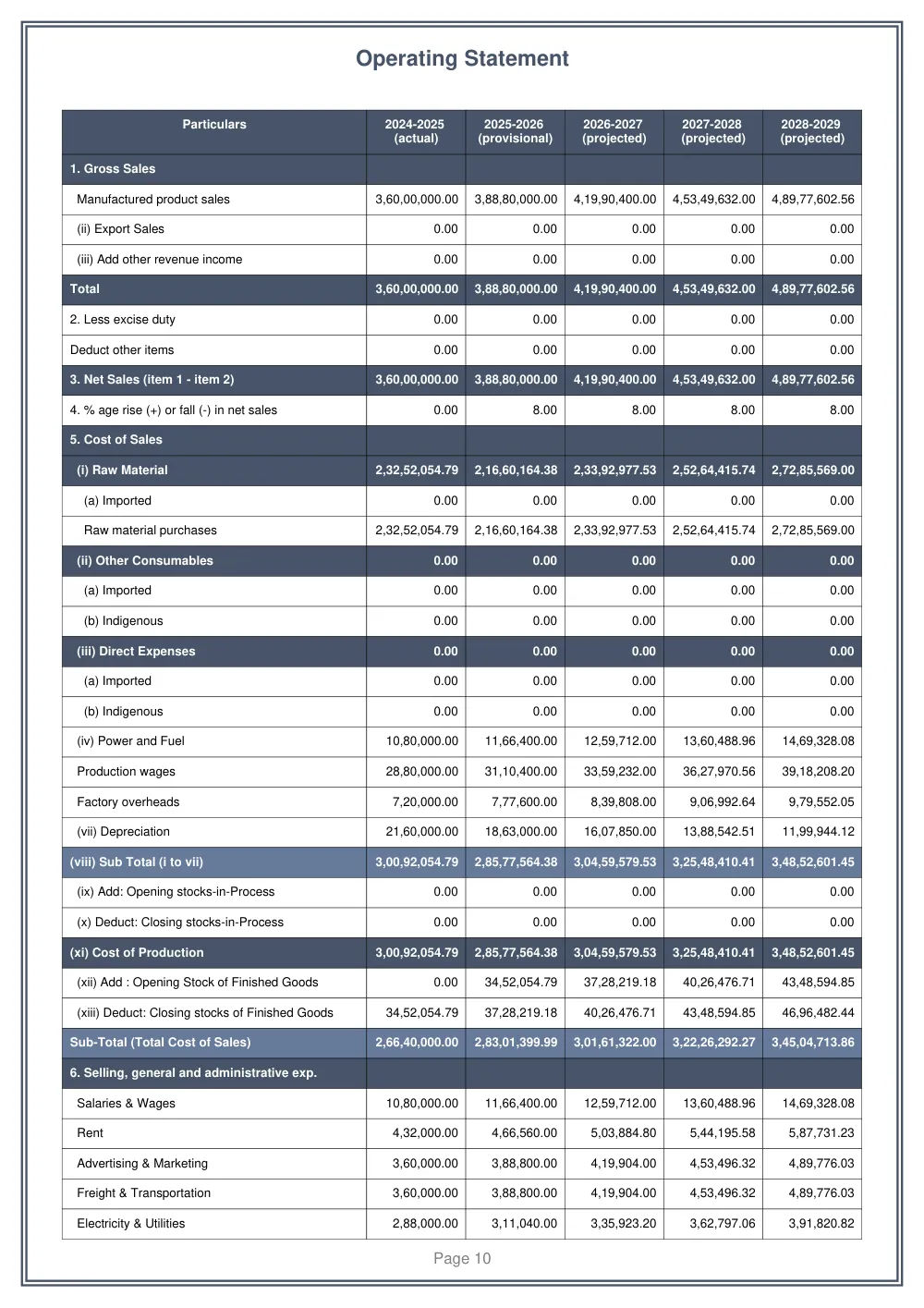
Reading a format is easier than reading about one. The samples library carries a filled CMA report you can open before signing up, with the operating statement, balance sheet, MPBF computation and ratio tables shown exactly as they print. Open the sample, compare it with the format your bank shared, and then start your own file.
Read moreOverview
It is built for chartered accountants, DSAs and finance teams who prepare loan files through the year. Saved figures stay linked across years, projections link across statements, and every total recalculates the moment an assumption changes, so the operating statement, balance sheet and MPBF computation always agree with each other.
When the file is ready, export it as a formatted PDF, an Excel workbook or a Word document and submit it to the bank. The sections below explain what CMA data is, which loans need it, exactly what the software produces, and how a first report moves from raw figures to a bank-ready PDF.
What is CMA data?
CMA stands for Credit Monitoring Arrangement: the set of financial statements Indian banks ask for before sanctioning working capital finance and during the annual review of existing limits. Unlike a project report for a new investment, CMA data presents the borrower as a going concern — what the business owns and owes, what it earns, and how much short-term finance its operating cycle can support.
In practice, CMA data combines audited history with the current year's provisional figures and projections, all presented in a fixed format of interlinked statements. Because every statement draws on the same inputs, a change in sales growth flows through the operating statement into the balance sheet, the fund flow statement and the MPBF computation without retyping.
Banks use this pack to judge liquidity, leverage and debt servicing capacity, and to fix the maximum permissible bank finance. A CMA report prepared in Finxora follows the standard CMA format used by Indian banks, so the relationship manager receives statements in the layout their credit team already works with.
Which loans need CMA data?
CMA data is asked for with most fund-based working capital facilities: cash credit, overdraft and working capital demand loans — new limits, enhancements and takeovers from another bank. Term loans with a working capital component usually need the same pack, since the bank assesses the whole borrowing together.
The second trigger is renewal. Working capital limits are typically reviewed every twelve months, and the review needs fresh CMA data with updated provisional figures and revised projections. Because each borrower's master stays saved, a renewal updates the provisional and projected years instead of rebuilding the file from scratch, and the comparative statements show the movement the bank wants to see.
If a facility letter does not name the statements, ask the relationship manager before the due date. Cash credit and overdraft renewals almost always need fresh CMA data; a small overdraft backed by deposits may only need account statements.
What the CMA report contains
A CMA report built in Finxora holds the statements a bank's credit team expects, generated from one set of inputs so the figures agree across the pack. Each statement below is a separate working screen in the app, and each one feeds the download.
The download keeps the order the credit team works in, with year columns and ratio tables formatted for print. You choose which statements to include, so a renewal file and a first application can carry different annexures.
- Operating statement — sales, direct and indirect costs, interest, tax and net profit for every year.
- Analysis of balance sheet — capital, reserves, borrowings, current liabilities and assets, year on year.
- Comparative statement of current assets and current liabilities, with changes and movement ratios.
- Computation of maximum permissible bank finance (MPBF) under the first method and the second method.
- Fund flow statement — sources and uses of long-term funds across the reporting years.
- Cash flow statement and DSCR analysis for debt servicing comfort.
- Turnover method computation for working capital assessment alongside the MPBF methods.
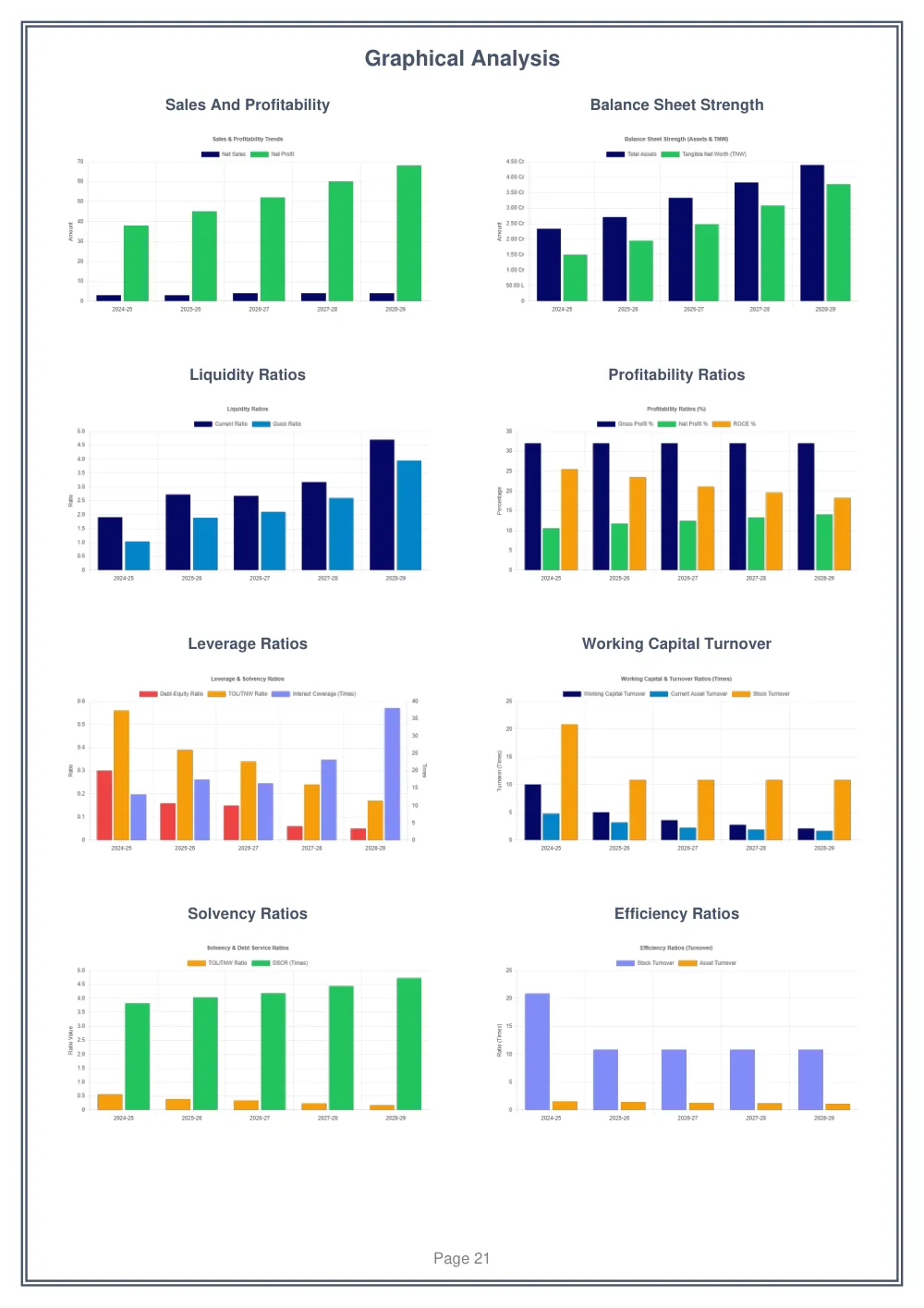
- Ratio analysis covering liquidity, profitability, leverage, activity, expense and growth ratios.
- Sensitivity analysis and break-even analysis for the projected years.
- Depreciation schedule linked to the fixed assets in the balance sheet.
- EMI schedule for term loans attached to the borrower.
- AI-drafted business introduction and project narrative, editable before download.
Ratios and MPBF the CMA report software calculates
Every ratio in the pack is calculated, not typed. Finxora computes the full CMA ratio set from the operating statement and balance sheet figures and measures each one against bank benchmarks. Change any input and the ratios recalculate immediately.
MPBF deserves its own note because it decides the limit. Finxora computes the first method and the second method side by side from the same balance sheet, with the turnover-method requirement and excess borrowing alongside — so you can see which method binds and defend the assessed limit.
- Liquidity: current ratio and quick ratio.
- Profitability: gross profit ratio, net profit ratio and return on capital employed (ROCE).
- Leverage: debt-equity ratio, total-outside-liabilities to net worth, total-term-liabilities to net worth, and interest coverage.
- Activity: stock turnover with fixed-asset, current-asset, working-capital, capital and total-assets turnover.
- Debt servicing: DSCR and interest coverage for every projected year.
- Working capital: MPBF under both methods, the turnover-method requirement, excess borrowing and margins on working capital.
- Growth and expense: sales, profit and net-worth growth with manufacturing, indirect, finance and non-operating expense ratios.
How to prepare CMA data in Finxora
Preparation follows the same order for a first proposal and a renewal. The five steps below mirror the screens in the app.
- Gather the documents: balance sheets for the last three years, profit and loss statements, bank statements and income tax returns.
- Enter the historical years: key in the audited and provisional figures, or pull them from a balance sheet already prepared in Finxora.
- Set the projection assumptions: sales growth, margins, the working capital cycle and existing loan details — or let Generate with AI estimate them from your firm and industry, then adjust anything you disagree with.
- Review the auto-calculated ratios and MPBF: check the ratio analysis, the fund flow statement and the maximum permissible bank finance, and adjust where needed.
- Download the bank-ready report: export the CMA report as a formatted PDF — or as an Excel workbook or Word document — and submit it to the bank.
Each of these screens is described in more detail in the features overview.
Sample CMA format
Reading a format is easier than reading about one. The samples library carries a filled CMA report you can open before signing up, with the operating statement, balance sheet, MPBF computation and ratio tables shown exactly as they print. Open the sample, compare it with the format your bank shared, and then start your own file.
Samples download in the same PDF, Excel and Word formats the app produces. When the format looks right, check the CMA plans on the pricing page or start free with your first statement.
Open the samples library to view the filled CMA report before you sign up.
CMA report software FAQs
What is the difference between CMA data and a CMA report?
The two phrases describe the same pack from opposite sides. CMA data is the set of figures — history, provisional numbers and projections — while the CMA report is those figures arranged into the standard statements banks read: operating statement, balance sheet analysis, MPBF computation, fund flow and ratios. Finxora assembles the report from data entered once.
Which loans need CMA data, and how often must it be renewed?
Cash credit, overdraft and other working capital limits need CMA data at sanction, at enhancement and at every annual renewal. Term loans with a working capital component usually need it too. Each renewal asks for updated provisional figures and fresh projections, which is why keeping the borrower's master in the software pays off from the second year onward.
What statements and ratios does the Finxora CMA report include?
The pack covers the operating statement, balance sheet analysis, comparative statement of current assets and current liabilities, MPBF computation under both methods, fund flow and cash flow statements, turnover method computation, DSCR, sensitivity and break-even analyses, depreciation and EMI schedules, and a ratio set covering liquidity, profitability, leverage, activity, expense and growth.
How does the software calculate MPBF?
From the balance sheet you enter, the software computes the first method and the second method side by side and places the turnover-method working capital requirement next to them, with excess borrowing and margins shown. Because all three readings share the same inputs, you can see at a glance which method binds and quote the assessed limit.
Can I reuse figures I already prepared in Finxora?
Yes. Audited and provisional figures entered in the balance sheet module can seed the historical years of a CMA report instead of being keyed in a second time, and closing balances carry forward between years. Saved masters keep the borrower's yearly details, so renewals and multi-year comparisons start from existing data.
In which formats can I download the CMA report?
Every CMA report exports as a formatted PDF for submission, as an Excel workbook for further working, and as a Word document for further editing. You select which statements go into each download, so the file sent to the bank carries exactly the annexures the sanction letter asked for — nothing more, nothing less.