
Balance sheet software for bank loans
Balance Sheet Software (Schedule III Format)
Finxora's balance sheet software turns trial-balance figures into a schedule-wise balance sheet that tallies, with the matching Trading and Profit & Loss Account, capital account, depreciation schedule and ratio analysis produced from the same data. The presentation follows the standard Schedule III format used for company balance sheets in India, with adapted layouts for proprietorships, partnerships, LLPs, HUFs, trusts and societies.
- PDF, Word and Excel export
- Schedule III format
- Tally import
What's covered
Everything this page explains, at a glance.
What is a balance sheet and the Schedule III format
A balance sheet is a statement of what a business owns and owes on a particular date: equity and liabilities on one side, assets on the other, with both sides agreeing. Banks ask for it with almost every loan application because it shows net worth, borrowing, receivables, inventory and cash at a glance, and the profit & loss account explains how the surplus moved during the year.
Read moreBalance sheet software formats by entity type
A proprietor does not have share capital and a trust does not distribute profit, so Finxora changes the equity section, the capital account and the income-statement title to match the constitution recorded on the master. One constitution selection drives every statement.
Read moreLayouts in balance sheet software: vertical, T and comparative
Finxora offers four balance-sheet layouts from the same underlying figures. The traditional T format sets the Trading and Profit & Loss Account and a Liabilities-versus-Assets balance sheet in the module's own heads without notes, which suits internal review and older files. The Schedule III vertical layout is the single-year statutory-style presentation with full notes, and the two-sided Schedule III variant keeps the note linkage in a horizontal arrangement.
Read moreImport from Tally
If the books already live in Tally, there is no need to retype them. Finxora reads a trial balance exported as XML from TallyPrime or Tally.ERP 9, suggests where each ledger belongs for your review before import, and lets you correct any suggestion before anything is imported. Fixed-asset ledgers become blocks in the depreciation chart, and ledger-level detail can be attached as head-wise supporting notes.
Read moreNotes to accounts
Schedules and notes are what turn a bare balance sheet into a document a bank or auditor can work with, and Finxora generates them from the same figures. Company masters can record authorised, issued and paid-up share capital with face value, and the share capital note then lists those rows together with shareholders holding more than five percent and the promoter holding.
Read moreHow to prepare a balance sheet in Finxora
Preparation follows the order of the books themselves: set up the entity and years, post the balances, record the fixed assets, then review and export. Each year's statements include the Trading and Profit & Loss Account, the capital account, the depreciation schedule, ratio analysis and the EMI repayment schedule where loans exist.
Read moreSample balance sheet format
To see the finished presentation before entering any data, open the samples collection, which carries a downloadable Automated Balance Sheet sample in PDF, Word and Excel with multi-year statements, detailed schedules and comparative analysis. It shows exactly how the Schedule III layouts, notes and ratio pages look when printed.
Read moreOverview
It is built for chartered accountants, accountants and MSMEs preparing audited, provisional and projected balance sheets for bank loans and internal review. Enter the figures once and Finxora groups them into the correct schedules, carries the statements forward across years, and exports a print-ready PDF, Word or Excel file — or reuses the same data inside a CMA report or project report without re-entry.
What is a balance sheet and the Schedule III format
A balance sheet is a statement of what a business owns and owes on a particular date: equity and liabilities on one side, assets on the other, with both sides agreeing. Banks ask for it with almost every loan application because it shows net worth, borrowing, receivables, inventory and cash at a glance, and the profit & loss account explains how the surplus moved during the year.
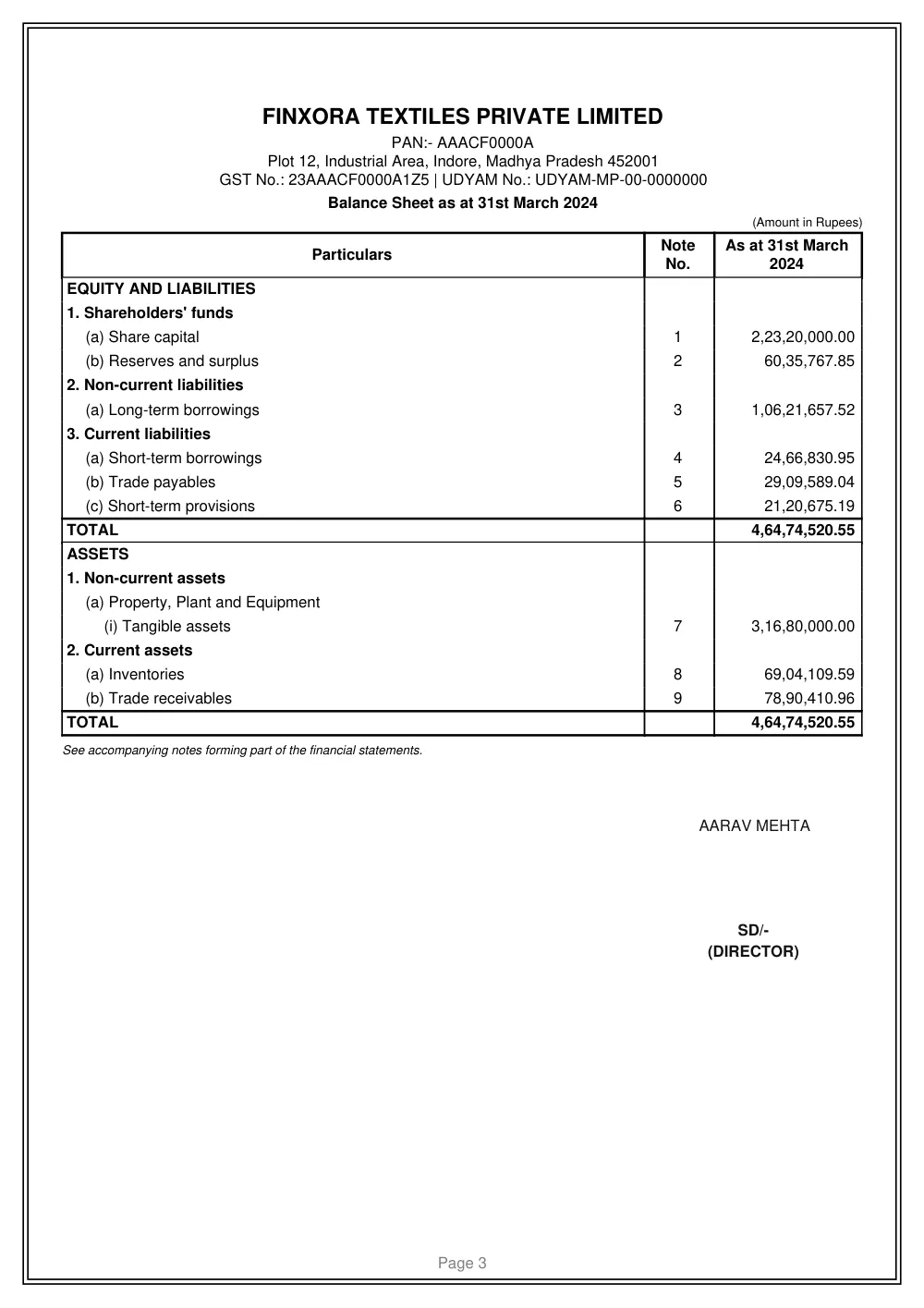
Schedule III of the Companies Act, 2013 prescribes the standard presentation for company balance sheets in India: a vertical statement with equity and liabilities first, then assets, each split into non-current and current, with notes cross-referenced from the face of the statement. Finxora follows this standard presentation for companies, and uses adapted Schedule III-style grids for other constitutions, since the statutory Schedule III applies to companies.
The main groups on a Schedule III balance sheet are:
| Side of the statement | Typical heads |
|---|---|
| Shareholders' funds | Share capital, reserves and surplus |
| Non-current liabilities | Long-term borrowings, deferred tax, long-term provisions |
| Current liabilities | Short-term borrowings, trade payables, other current liabilities |
| Non-current assets | Fixed assets, non-current investments, long-term loans and advances |
| Current assets | Inventories, trade receivables, cash and bank balances, short-term advances |
Balance sheet software formats by entity type
A proprietor does not have share capital and a trust does not distribute profit, so Finxora changes the equity section, the capital account and the income-statement title to match the constitution recorded on the master. One constitution selection drives every statement.
For not-for-profit constitutions the wording switches to fund accounting: trusts show a corpus fund with an Income and Expenditure Account, and societies show a general fund, each signed by the appropriate office-bearer rather than a director or partner.
| Entity | Equity section and signatory |
|---|---|
| Proprietorship | Proprietor's capital account, signed by the proprietor |
| Partnership firm | Partners' capital account with one block per partner |
| LLP | Partners' contribution, signed by the designated partner |
| Company (private or public limited) | Share capital with authorised, issued and paid-up note, plus reserves |
| HUF | Karta's capital account, signed by the Karta |
| Trust and society | Corpus or general fund with Income and Expenditure Account |
Layouts in balance sheet software: vertical, T and comparative
Finxora offers four balance-sheet layouts from the same underlying figures. The traditional T format sets the Trading and Profit & Loss Account and a Liabilities-versus-Assets balance sheet in the module's own heads without notes, which suits internal review and older files. The Schedule III vertical layout is the single-year statutory-style presentation with full notes, and the two-sided Schedule III variant keeps the note linkage in a horizontal arrangement.
The comparative layout places the reporting year beside the previous year, column for column, which is what banks usually want when they ask for two or three years of financials. Notes can be printed in compact or detailed mode, and the Note No. column that ties each face-of-statement line to its supporting note can be shown or hidden.
| Layout | When to use it |
|---|---|
| Schedule III vertical | Single-year company-style statement with notes |
| Schedule III comparative | Current year beside the previous year for bank submissions |
| Schedule III two-sided | Schedule III heads with notes in a horizontal arrangement |
| Traditional T format | Liabilities-versus-Assets view in own heads, without notes |
Import from Tally
If the books already live in Tally, there is no need to retype them. Finxora reads a trial balance exported as XML from TallyPrime or Tally.ERP 9, suggests where each ledger belongs for your review before import, and lets you correct any suggestion before anything is imported. Fixed-asset ledgers become blocks in the depreciation chart, and ledger-level detail can be attached as head-wise supporting notes.
Review the mapped lines, enter the closing stock for the year, and the import builds the year's operating statement and balance sheet from the mapped trial balance.
- Export the Trial Balance report from Tally as XML and upload the file in Finxora.
- Check the suggested mapping of each Tally group and ledger, and move any line that belongs elsewhere.
- Confirm fixed-asset blocks and depreciation treatment, then enter the closing stock figure.
- Import the year and verify that the balance sheet tallies before downloading or carrying it forward.
Notes to accounts
Schedules and notes are what turn a bare balance sheet into a document a bank or auditor can work with, and Finxora generates them from the same figures. Company masters can record authorised, issued and paid-up share capital with face value, and the share capital note then lists those rows together with shareholders holding more than five percent and the promoter holding.
Ageing disclosures for trade receivables and trade payables, the MSME-versus-others split of payables, and free-text additional notes per head are all supported, and imports from Tally can attach ledger-wise detail notes automatically. Every note stays linked to its statement line through the Note No. reference.
- Share capital note: authorised, issued and paid-up capital with large-shareholder and promoter disclosures
- Ageing schedules for trade receivables and trade payables
- MSME and others disclosure for trade payables
- Head-wise additional notes, including ledger detail carried in from a Tally import
- Compact or detailed note printing with an optional Note No. column
How to prepare a balance sheet in Finxora
Preparation follows the order of the books themselves: set up the entity and years, post the balances, record the fixed assets, then review and export. Each year's statements include the Trading and Profit & Loss Account, the capital account, the depreciation schedule, ratio analysis and the EMI repayment schedule where loans exist.
- Enter the firm's details and choose the years to prepare — audited, provisional or projected.
- Post the grouped trial-balance figures for assets, liabilities, income and expenses into the correct schedules.
- Maintain the fixed-asset schedule so depreciation and written-down values flow into the statements.
- Check that the balance sheet tallies, then review the profit & loss account, capital account and ratios.
- Download the print-ready PDF, Word or Excel file, or carry the figures into a CMA report or project report.
Sample balance sheet format
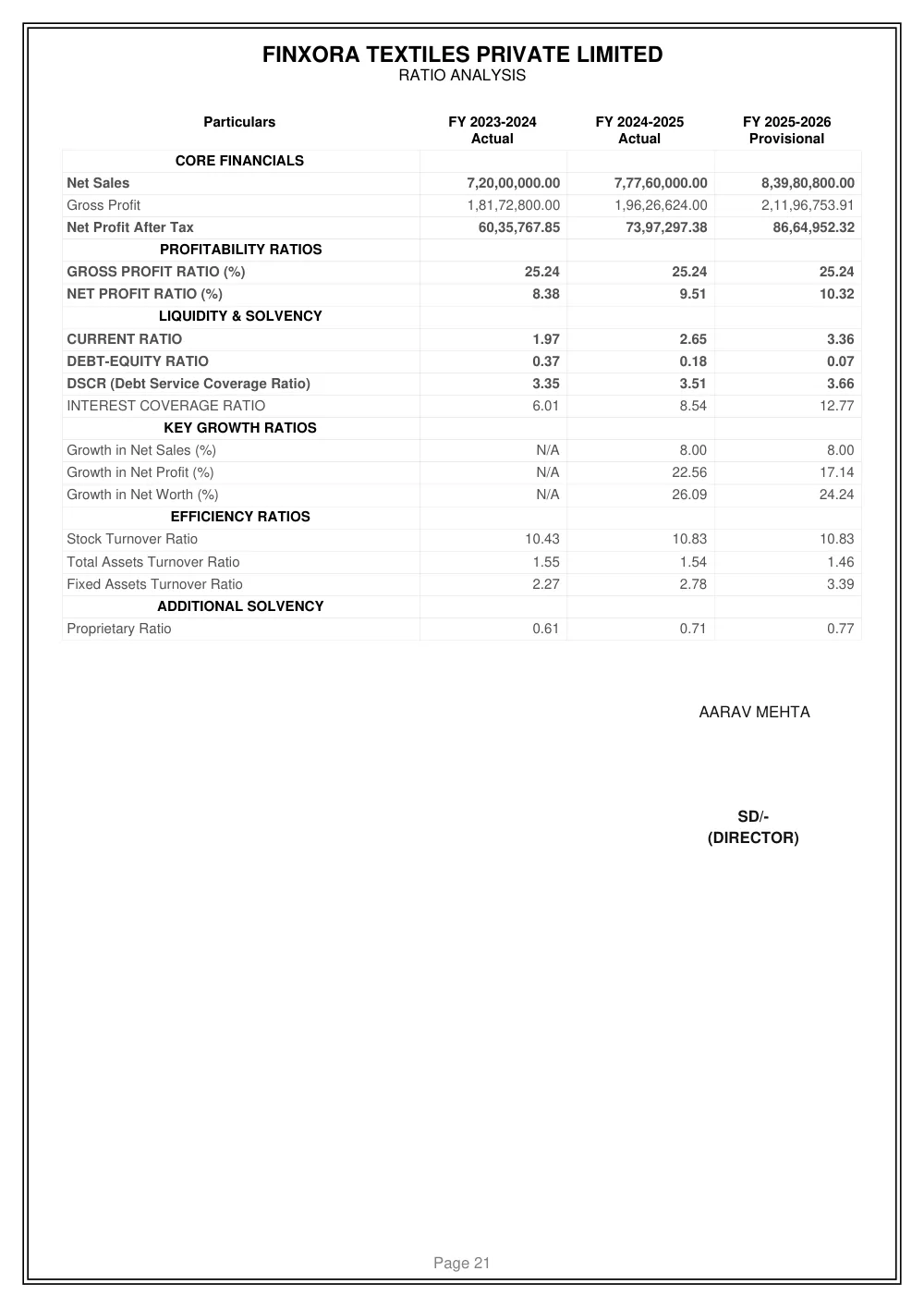
To see the finished presentation before entering any data, open the samples collection, which carries a downloadable Automated Balance Sheet sample in PDF, Word and Excel with multi-year statements, detailed schedules and comparative analysis. It shows exactly how the Schedule III layouts, notes and ratio pages look when printed.
Balance sheet software: frequently asked questions
Which balance sheet layouts does Finxora's balance sheet software support?
Four layouts are available from the same figures: the Schedule III vertical layout for a single year with notes, the Schedule III comparative layout with the reporting year beside the previous year, a two-sided Schedule III arrangement that keeps note linkage in a horizontal view, and the traditional T format with Liabilities against Assets in the module's own heads without notes.
Does the balance sheet software handle proprietorship, partnership, LLP and company formats?
Yes. The equity section, capital account, income-statement title and signatory all follow the constitution on the master: a proprietor's capital account for proprietorships, partners' capital for firms, partners' contribution for LLPs, share capital with authorised, issued and paid-up detail for companies, a Karta account for HUFs, and corpus or general funds with an Income and Expenditure Account for trusts and societies.
Can I import my books from Tally into the balance sheet?
Yes. Export the Trial Balance from TallyPrime or Tally.ERP 9 as XML and upload it; Finxora suggests a mapping for every group and ledger, which you confirm or correct before importing. Fixed-asset ledgers become depreciation-chart blocks, ledger detail can attach as supporting notes, and you enter the closing stock during the import to complete the build.
Can I prepare provisional and projected balance sheets as well as audited ones?
Yes. Years can be marked audited, provisional or projected, which matches how banks ask for financials: past audited years, the current provisional year and future projected years side by side. Each year's closing position feeds the next year's opening figures, so depreciation, reserves and loan balances stay consistent across the whole span instead of being re-entered per year.
In which formats can I download the balance sheet?
Every report downloads as a formatted, print-ready file in PDF, Word or Excel, with a cover page carrying your firm's details and an optional CA signatory block. The same download dialog also offers the Trading and Profit & Loss Account, capital account, depreciation schedule, ratio analysis and EMI schedule from the same data.
Can a balance sheet prepared here be reused in a CMA or project report?
Yes. The balance sheet, CMA and project report modules share data inside Finxora, so finished balance-sheet years can seed the historical years of a CMA report or a project report directly. That keeps the audited figures identical across documents and removes a full round of re-entry and the reconciliation differences it usually creates.